SmartTruckRoute Truck GPS Navi
- 4.1
- Rating
- 500.00K
- Installs
- Free
- Price
 Analysis by App-foxy
Driving a truck through an unfamiliar city is a very different job from following the quickest route in a regular car. A road that looks perfectly suitable on a phone map can become a serious problem when the vehicle is tall, heavy, or restricted from certain streets. That is the problem SmartTruckRoute Truck GPS Navi tries to solve, and after using it as a dedicated navigation tool, I found its focus refreshingly practical.
This is a free Maps & Navigation app from SmartRouting, designed around truck-oriented routing rather than ordinary turn-by-turn directions. Its main appeal is simple: it aims to guide commercial drivers away from low bridges and roads with restrictions, while keeping its maps updated daily. That does not make it a substitute for careful driving or posted signs, but it changes the way I think about route planning.
My short verdict is that SmartTruckRoute is most useful when vehicle clearance and road access matter more than shaving a few minutes from a journey. It is a stronger fit for truckers, delivery drivers, and people operating larger vehicles than for someone who only needs occasional car navigation. At the same time, it requires sensible checking before departure, and its paid extras mean the free starting point may not be the whole experience.
You May Also Like

 Blood Strike: 2.5 Anniversary
Blood Strike’s Loadouts Turn Every Drop Into a Tactical Gamble
A close look at Blood Strike’s custom loadouts: how fast access to signature weapons reshapes its battle royale rhythm, rewards preparation, and narrows the gap between fights.

 Pandora - Music & Podcasts
Pandora’s Music Is Easy to Start, but Harder to Recover
Pandora’s strength is its low-effort path from a seed to a station. Its weak spot is how much confidence it asks you to place in connection, setup, and quiet recovery.

 8 Ball Pool
 Is Built on Rivalries, Rematches, and Routine
A close look at the rivalries, rematches, shared routines, and unanswered safety questions that turn a quick pool match into a persistent mobile community.

 Samsung Music
’s Quiet Strength Is Playing What You Already Own
Its reach comes less from spectacle than from dependable access to a personal library. That simplicity is both the app’s strongest retention engine and its ceiling.

 AccuWeather: Weather Radar
AccuWeather Review: A Quick, Clear Forecast for Everyday Decisions
For everyday plans, the best forecast is the one you can understand quickly. AccuWeather makes rain timing, radar, and local conditions easy to act on, with a few trade-offs.

 Hill Climb Racing
Why Hill Climb Racing Still Turns Crashes Into One More Run
A tiny car, a bumpy hill and one more upgrade: Hill Climb Racing keeps resurfacing because its simple chaos makes every near-miss feel personal.
More From Our News Desk



How the current version fits into a truck driver’s routine
The current release is version 2.2.101.1, and the app has been around since December 21, 2012. That long presence matters because truck navigation is not a novelty category: drivers need a tool they can build into a repeatable routine, not just a flashy map that works well in a demonstration.
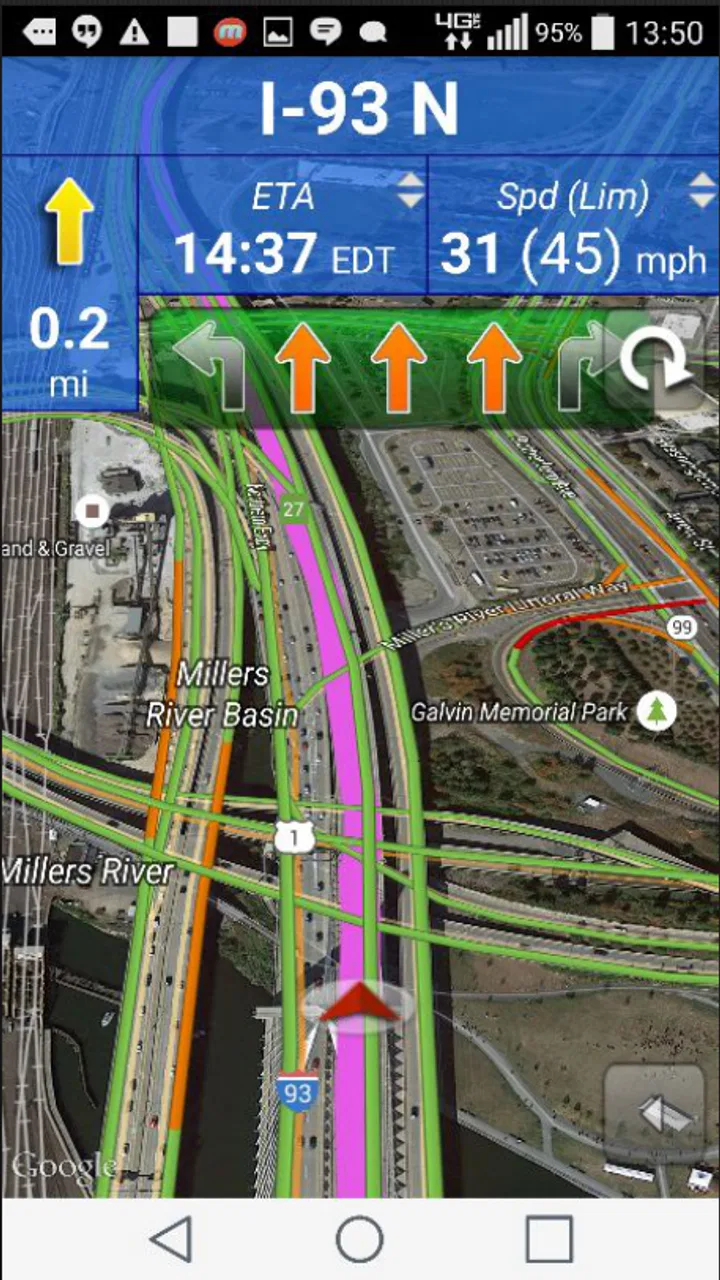
I would use it in two stages. First, I would enter the destination before leaving and examine the suggested route with the vehicle’s real limitations in mind. Then, once moving, I would treat the spoken directions as support rather than permission to ignore signs, temporary closures, or instructions from a depot or site manager. This habit is particularly important when a route crosses several towns, where restrictions can change quickly.
The app’s store summary highlights daily map updates. In practical terms, that makes it more interesting for regular drivers than a navigation app that only gets occasional attention. A current map can help with changing road information, but daily updating should not be interpreted as a guarantee that every temporary restriction, construction zone, or newly posted sign will appear immediately. I would still check the final approach to a loading point whenever the destination is unfamiliar.
Its minimum operating requirement is Android 4.0.3, which makes the app accessible to owners of older Android hardware. That can be useful for a dedicated cab device rather than a personal phone. Older compatibility is convenient, although the actual experience will still depend on the phone’s condition, GPS reception, battery health, and whether the device can keep the app visible during a long shift.
Where the truck focus makes a real difference
Most familiar navigation apps are built around the assumptions of a passenger car. They are excellent at finding a fast route, showing traffic, and helping someone reach a shop or home address. Their weakness appears when the route must respect height, weight, or truck-access rules. A car can pass under a bridge that a high vehicle cannot, and a street that is legal for a private vehicle may be unsuitable for a commercial truck.
SmartTruckRoute’s value is therefore not simply that it draws a line from one point to another. Its value is the attempt to make that line relevant to the vehicle using it. For a driver carrying a tall trailer, that distinction is more important than a polished interface or a route that looks slightly shorter.
One useful workflow is to compare the app’s proposed route with the route you already know. If SmartTruckRoute sends you around a familiar low-clearance area, that is a helpful reminder that the detour has a reason. If it produces a route that conflicts with a site’s delivery instructions, I would not blindly follow either option; I would use the difference as a prompt to investigate the final streets before setting off.
Another practical habit is to enter the actual delivery entrance rather than stopping at the company’s general address. Large facilities often have separate gates, and the road suitable for the office may not be the road used by trucks. The app can help with the journey to the area, but the last part still deserves attention because private yards, one-way systems, and gate instructions are not always represented in the same way as public roads.
What the long-running product history suggests
Because the app has existed since 2012, existing users are likely to value familiarity more than novelty. A driver who has already built a routine around it may appreciate receiving a current version without having to learn an entirely different navigation concept. The present version number, 2.2.101.1, indicates a product that has progressed through multiple revisions, but I would judge the update by whether it makes daily routing clearer and more dependable rather than by the number itself.
The important evolution here is the continued emphasis on truck-specific routing and map maintenance. That is more meaningful than adding decorative features. For a professional driver, a route decision that avoids a restriction can save far more trouble than a minor visual improvement. I would also expect long-time users to notice changes in route suggestions after updates, especially if map information has been refreshed. A familiar journey may not always be identical, and that is not automatically a fault; it may reflect a changed road rule or a revised map interpretation.
New users should give themselves time to understand how the app behaves before relying on it for a demanding trip. I would test it on a known local route, compare the directions with actual truck access, and learn where the route feels conservative or aggressive. That small trial is more valuable than assuming that any navigation app will make perfect decisions immediately.
Using it day to day: strengths, trade-offs, and sensible checks
The app is rated an average of 4.1 from around 4.1 thousand ratings, with roughly 1.8 thousand written reviews. Those figures suggest that many people find the concept useful, while the less-than-perfect average is also a reminder that navigation quality depends heavily on location, device, road conditions, and personal expectations. I would read that combination as encouraging rather than conclusive: the idea clearly works for a substantial group, but no route planner should be treated as universally reliable.
Its audience is also visible in its reach. SmartTruckRoute has passed 500 thousand installs, which is a respectable footprint for a specialized truck navigation app. That does not prove that every route is correct, but it does make the product easier to take seriously than an obscure tool with no established user base.
For an everyday example, imagine a driver leaving a warehouse before sunrise with a high trailer and a delivery scheduled across town. A normal navigation app may prioritize the quickest arterial road and send the driver toward a bridge that is unsuitable for the vehicle. With SmartTruckRoute, I would plan the route while parked, inspect the larger detour, and leave extra time for it. The detour might be slower, but arriving safely at the customer is more valuable than discovering a clearance problem at the worst possible point.
A second use case is regional delivery work. Repeated routes can create overconfidence, especially when a driver assumes that a familiar road is still available to trucks. I would use the app to recheck the route each morning rather than relying only on memory. That is one of the less obvious benefits of a navigation tool with regularly updated maps: it encourages a fresh review instead of silently repeating yesterday’s assumptions.
There is also a useful trade-off between simplicity and control. A truck-focused app can reduce the mental work of translating car directions into truck-safe decisions. However, the driver still needs to understand the vehicle’s dimensions and operating limits. If the app asks for vehicle details or routing preferences, entering them carefully is essential; a wrong setting can be more dangerous than no setting at all. I would never use a generic vehicle profile when the journey involves a particularly tall, heavy, or long combination.
What existing users may notice after updates
For people who have used earlier releases, the most important effect of ongoing development is likely to be route behavior rather than a dramatic change in appearance. Daily map maintenance can alter a recommendation, remove a road from consideration, or create a different approach to a destination. Existing users should therefore avoid assuming that an old saved habit is still the best choice simply because the road looks familiar.
I recommend checking a route after an update on a journey that you already know. This gives you a safe comparison point. Look for changes near bridges, town centers, industrial estates, and the final delivery entrance. Those are the places where a truck-oriented planner’s decisions matter most, and they are also where local restrictions can make a route feel unexpectedly different.
Another point for established users is device age. The minimum Android requirement is low enough to support older phones, but an old handset may struggle with heat, charging, or GPS stability during a long drive. If the screen freezes or location updates lag, the problem may not be the routing logic itself. I would keep the phone securely mounted, connected to reliable power, and positioned where it can maintain a good satellite signal without obstructing visibility.
The app is free to install, which makes testing relatively easy. However, in-app purchases range from $19.99 to $159.99 per item. That is a significant spread, so I would inspect exactly what a purchase adds before committing. A free download is useful for evaluating the interface and basic suitability, but professional users should calculate the cost against their actual driving needs rather than assuming every important capability is included at no charge.
Where it still needs help from the driver
The biggest limitation is shared by nearly every navigation system: a map cannot replace physical observation. A sign at a bridge, a temporary road closure, a police instruction, or a site-specific restriction takes priority over an app. SmartTruckRoute’s truck focus makes it a better planning aid for these situations, but it does not remove the responsibility to verify the road while driving.
I would also be cautious with the final few hundred metres of a delivery. A route can be suitable for a truck until it reaches a private entrance, a narrow yard, or a gate intended for smaller vehicles. The app may get me to the correct neighborhood, but I would confirm the receiving site’s instructions and, when possible, look at the approach before committing a large vehicle.
Drivers who mainly use a car may find the specialized approach unnecessary. If your priorities are live congestion, walking directions, public transport, or finding nearby businesses, a mainstream navigation app may offer a broader and more convenient package. SmartTruckRoute makes sense when truck restrictions are central to the journey; it is not automatically the best single navigation app for every member of a household.
It may also be a poor fit for someone who wants completely hands-off routing. The app can reduce guesswork, but responsible use still involves entering the right vehicle information, checking unusual detours, and staying alert to road signs. Anyone unwilling to do those checks should not rely on a truck GPS tool, regardless of the brand.
Questions I would settle before depending on it
The first question is whether it can replace a paper atlas or a second navigation source. I would not make that replacement immediately. For routine work, it may become my main planner, but I would keep a backup plan for poor signal, device failure, or a route that looks questionable. A printed local map or another trusted navigation option can be valuable when a phone becomes unusable.
The second question is whether daily map updates eliminate the need to check restrictions. They do not. Updated mapping is a strong reason to keep the app current, but temporary events and newly posted signs can outpace any digital service. I would treat updated maps as a better starting point, not as a legal or physical guarantee.
The third question concerns older Android phones. Since Android 4.0.3 is supported as the minimum, an older device may be able to install the app, but I would test navigation, voice guidance, charging, and screen visibility before taking it on a paid delivery. Compatibility is not the same as a comfortable or dependable driving setup.
The fourth question is whether the paid options are worthwhile. That depends on how often I drive a truck and which functions I need. Occasional users can begin with the free installation and see whether the route planning suits them. Frequent commercial drivers should compare the available purchase against the cost of a wrong turn, a delayed delivery, or an unsuitable road, while still checking the purchase details carefully before paying.
My recommendation for different kinds of drivers
I would recommend SmartTruckRoute to drivers who regularly deal with bridges, restricted streets, industrial areas, or unfamiliar delivery routes. It is especially sensible for someone who has already experienced the difference between a car-friendly route and a truck-appropriate one. The app’s truck-first purpose, established history, and daily map-update emphasis give it a clear identity instead of trying to be everything to everyone.
I would be more hesitant to recommend it as the only navigation tool for occasional users, private motorists, or drivers whose main concern is traffic speed. Those people may get more value from a general navigation service with stronger coverage of everyday travel features. They can still use this app when vehicle clearance is the deciding issue, but its specialized focus may feel excessive for ordinary car trips.
My best advice is to test it before a critical journey. Plan a familiar route, compare the result with known truck access, check the destination entrance, and learn how the app handles detours. If it consistently helps you avoid roads that would make you uncomfortable in your vehicle, it has earned a place in your cab. If its suggestions conflict with local knowledge or fail to match your operating needs, use that experience as a reason to adjust your workflow rather than following it automatically.
SmartRouting has built SmartTruckRoute around a problem that ordinary navigation often handles poorly. The app is not magic, and it cannot see every temporary condition, but it gives truck drivers a more relevant starting point than a car-oriented route planner. With version 2.2.101.1, a free entry point, Everyone content rating, and a focus on truck-safe route planning, it is worth trying for the right audience.
The feature I would watch most closely is not a flashy interface change but the continued quality of route and restriction information. For existing users, future updates will matter when they improve confidence on difficult approaches and keep familiar routes aligned with real road conditions. For new users, the sensible approach is to combine the app’s guidance with vehicle knowledge, current signs, and a little preparation. Used that way, SmartTruckRoute can be a genuinely helpful companion rather than a source of false certainty.
FAQs for SmartTruckRoute Truck GPS Navi
01What is SmartTruckRoute Truck GPS Navi, and who is it designed for?
SmartTruckRoute Truck GPS Navi is a navigation app created specifically for professional truck drivers and commercial fleets. Unlike a standard car navigation app, it can consider truck-related details such as vehicle dimensions, weight, height, and hazardous-material restrictions when planning routes. It is particularly useful for drivers who need practical guidance for deliveries, long-distance trips, and avoiding roads unsuitable for large vehicles.
02Can SmartTruckRoute calculate routes based on my truck’s size and weight?
Yes, one of the app’s main advantages is its ability to use truck profile information when calculating routes. Depending on the settings and available map data, you can enter details such as height, length, width, weight, axle information, and hazmat classifications. These details help the app avoid restricted roads, low bridges, weight-limited areas, and other hazards, although drivers should always confirm signs and local regulations.
03Does SmartTruckRoute Truck GPS Navi work without an internet connection?
The app may support offline navigation features, but the exact availability can depend on the subscription, platform, downloaded map coverage, and app version. Even when offline maps are available, an internet connection may still be required for live traffic, weather information, updated road conditions, account services, or route changes. It is best to download the necessary maps and test them before starting a trip in an area with weak coverage.
04Does the app provide truck-specific traffic information and useful delivery features?
SmartTruckRoute is designed to offer more than basic turn-by-turn directions. Depending on your plan and region, it may provide truck-focused routing, traffic information, estimated arrival times, fuel or rest-stop planning, and tools useful for delivery work. The experience can vary by location and data availability, so drivers should treat the suggested arrival time as an estimate and allow extra time for loading, unloading, inspections, and parking.
05Is SmartTruckRoute Truck GPS Navi free to download, and is a subscription required?
The application can generally be downloaded without paying an upfront installation fee, but some navigation functions, map access, traffic services, or professional truck features may require a subscription or in-app purchase. Pricing and included tools can differ between Android and iOS, as well as by country. Before subscribing, review the current store listing, trial conditions, renewal terms, and cancellation policy to avoid unexpected charges.
Pros
- Plans routes around truck restrictions
- weight limits
- and vehicle dimensions.
- Provides turn-by-turn navigation designed specifically for commercial drivers.
- Offers live traffic updates to help avoid congestion and reduce driving delays.
- Supports multiple truck profiles for fleets with different vehicle specifications.
- Includes route planning tools useful for managing stops
- fuel
- and delivery schedules.
Cons
- Some advanced navigation and fleet features require a paid subscription.
- Map accuracy can vary by region
- especially on smaller or recently changed roads.
- The app may use significant battery and mobile data during long journeys.
- Truck settings must be entered accurately to avoid unsuitable route suggestions.
- The interface can feel busy when many alerts and route details appear at once.

SmartTruckRoute Truck GPS Navi
Gallery